Guide
Which app should you use to track your work hours?
An honest comparison of six ways to track work hours as an international student in Canada: Clockify, Toggl Track, Hours Tracker, WorkingHours, a spreadsheet and Hourpip, our own app. Each one wins at something different.
What a student needs from a tracker
IRCC says you are responsible for keeping track of the hours you work off campus (IRCC). Any tool works if you use it every week. What matters most:
- All your jobs in one place, added up per week.
- Shifts that cross midnight, split into the right day.
- Unpaid breaks taken off.
- A record you can export and keep, next to your pay stubs.
Most time trackers are built for freelancers and teams who bill clients. They do these things well, but none of the general ones we checked mentions the study-permit limit or school breaks.
At a glance
| App | Best for | Price | Knows the 24-hour limit |
|---|---|---|---|
| Clockify | Free time tracking for freelancers and teams | Free plan. Paid plans from US$3.99 per user per month, billed annually. | No |
| Toggl Track | Freelancers who track time by project | Free plan for small teams. Paid plans from $9 per user per month, billed annually. | No |
| Hours Tracker | Hourly workers who want their pay calculated | Free for up to 3 jobs and 21 days of entries. Premium CA$6.99 per month or CA$39.99 per year. | No |
| WorkingHours | Overtime and spreadsheet exports | Free. Pro is a one-time purchase (price not shown on its site). | No |
| A spreadsheet | Free and fully under your control | Free with Google Sheets or LibreOffice Calc. | Only if you build it |
| Hourpip | The 24-hour limit and your school breaks | Free. Coming soon to the App Store and Google Play. | Yes, with school breaks |
Clockify
Free time tracking for freelancers and teams
Clockify is a time tracker with a timer and timesheets on the web, on computers and on phones. Its free plan is generous. Paid plans start at US$3.99 per seat per month billed annually, or US$4.99 billed monthly (Clockify pricing).
- Where it wins
- A strong free plan, on every device.
- What it misses
- It is built around projects and clients. It doesn’t know the 24-hour limit or your school breaks.
Toggl Track
Freelancers who track time by project
Toggl Track is a polished time tracker for freelancers and teams. Its free plan covers a small team (up to 3 users, says its FAQ). Starter costs $9 per user per month billed annually, or $12 billed monthly (Toggl pricing).
- Where it wins
- Clear reports and a timer that is quick to use.
- What it misses
- Like Clockify, it is made for billing projects, not for a weekly work limit.
Hours Tracker
Hourly workers who want their pay calculated
Hours Tracker, by Cribasoft, is an app for hourly workers that also works out your pay. The free edition keeps up to 3 jobs and 21 days of entries. Premium costs CA$6.99 per month or CA$39.99 per year, and Unlimited CA$9.99 per month or CA$59.99 per year (App Store).
- Where it wins
- Your pay and earnings, worked out for you.
- What it misses
- The free edition keeps only 21 days, shorter than a term. It doesn’t know the study-permit limit.
WorkingHours
Overtime and spreadsheet exports
WorkingHours tracks your hours and overtime on several platforms and exports to Excel and CSV. It is free to use. Pro is a one-time purchase per platform, with an optional monthly subscription on Android (WorkingHours).
- Where it wins
- Good exports, and Pro without a subscription.
- What it misses
- It doesn’t know the 24-hour limit or your school breaks.
A spreadsheet
Free and fully under your control
A spreadsheet is what many advisers suggest. Use one row per shift: date, job, start, end, unpaid break and hours. Add a weekly total and compare it with 24.
- Where it wins
- Free, flexible, and you own the file.
- What it misses
- Shifts past midnight and Monday-to-Sunday totals need formulas, and it is easy to forget a week.
Hourpip
The 24-hour limit and your school breaks
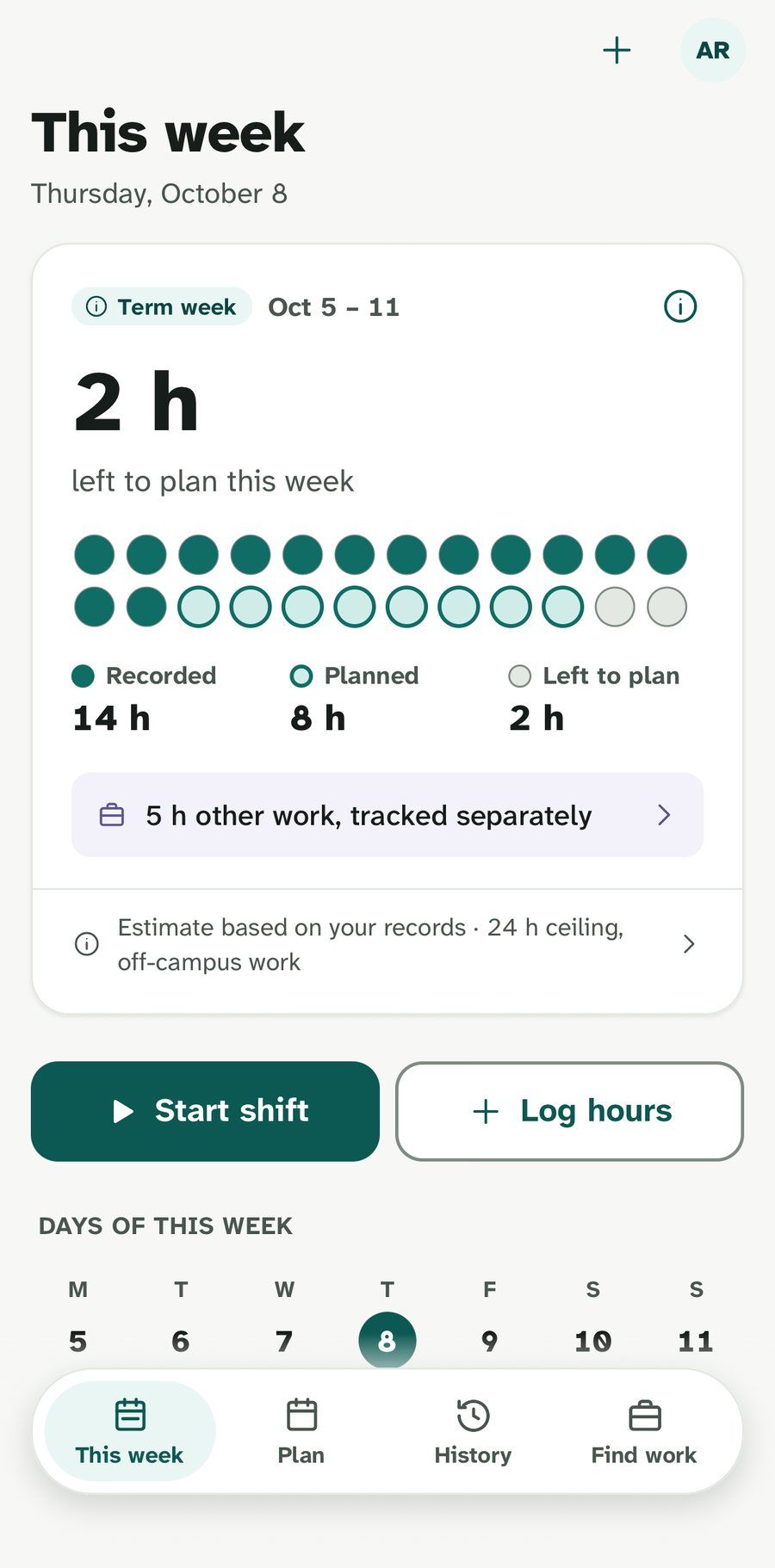
Hourpip is our app, so read this part with that in mind. It is made for international students in Canada. It adds up your off-campus jobs per week, Monday to Sunday, and shows the hours left under 24. Your school’s scheduled breaks are built in, so the limit only shows when it applies. On-campus, remote-abroad and placement hours are tracked separately.
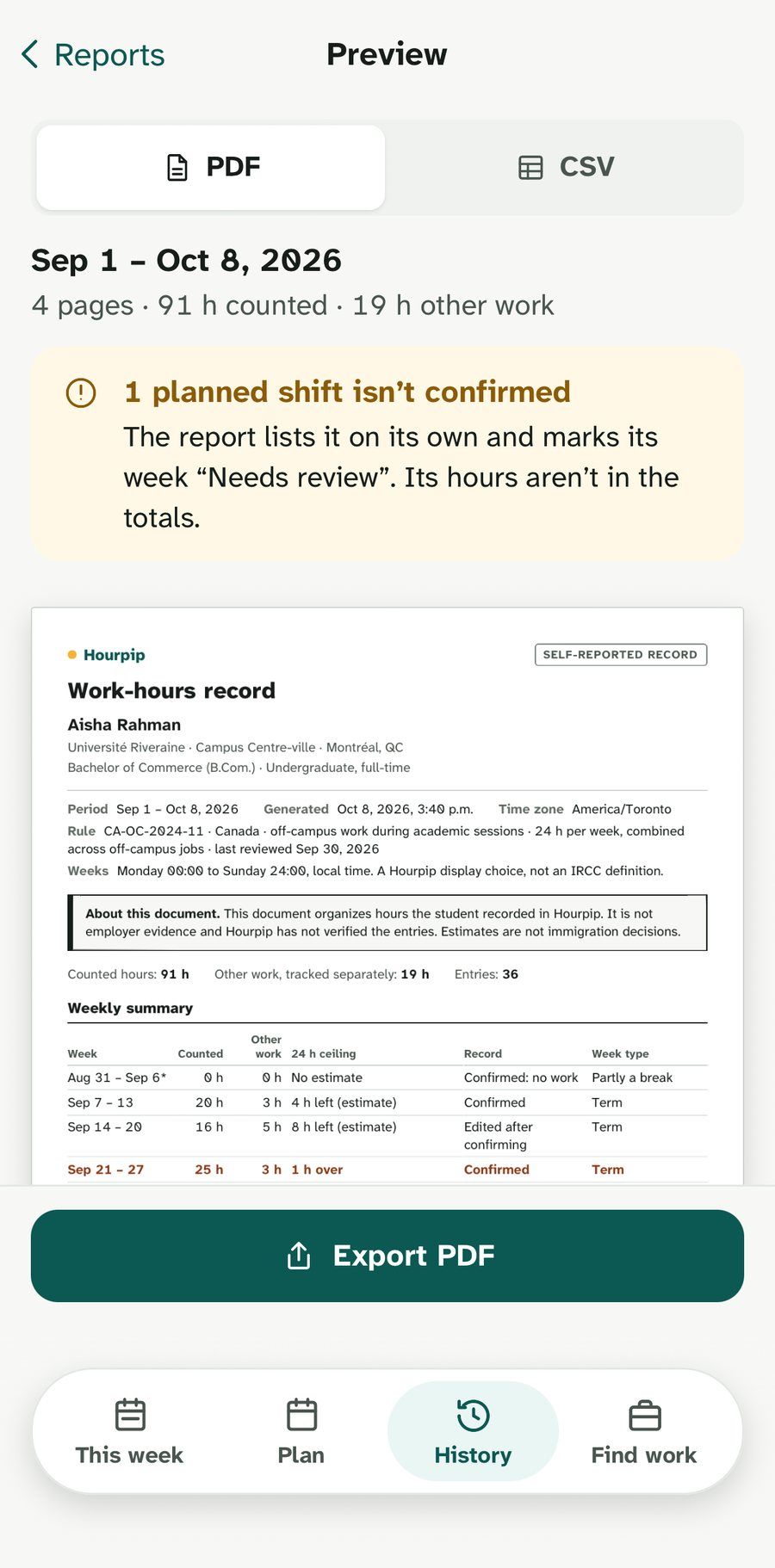
It has a shift timer, repeating schedules and PDF and CSV exports, works offline, and is written in English and Québec French. It never asks for your study permit, UCI or SIN.
- Where it wins
- The only one here that knows the study-permit limit and school breaks.
- What it misses
- It isn’t released yet, it doesn’t calculate pay, and it only runs on phones.
What Hourpip’s screens show
The week screen shows the hours you recorded and planned against the limit. The PDF export lists every shift, splits shifts that cross midnight into the right day and week, and summarizes each week. It is a self-reported record, not proof from your employer, so keep your pay stubs too.
The bottom line
If you freelance or track projects, Toggl Track or Clockify is the better tool. If you want your pay calculated, Hours Tracker does it. If you want something free that you fully control, a spreadsheet works. If what worries you is the 24-hour limit and your school breaks, that is what Hourpip is built for.
Whatever you choose, add up each week, Monday to Sunday, and keep your pay stubs. Our work hours calculator works in your browser if you want to check a week, and how many hours you can work explains what counts.